LeanLaw - Legal Billing Tool3.2.30 - App Store

Please wait ... The app listing is being verified for availability.
You'll be able to see results in few seconds.


Publisher Description

LeanLaw customizes QuickBooks Online for law firms. A cloud-based, legal time tracking app that creates ridiculously easy timekeeping and expense entries for attorneys. The app is an add-on to our legal timekeeping & billing software which offers a fully automated workflow that includes: Legal time tracking, 1-click IOLTA trust accounting, LEDES, invoicing in minutes - including bulk invoicing, a transparent information dashboard and reports on the financial health of your law firm.

The workflow we enabled has solved QuickBooks for lawyers: No more syncing because you are always in sync. No more manual workarounds.

Killer Features include:

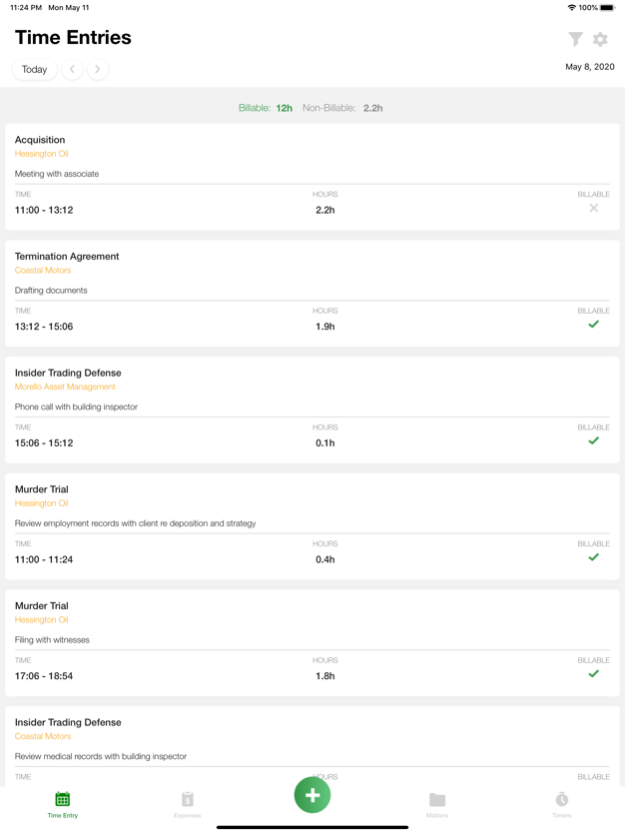
RIDICULOUSLY EASY TIME ENTRY
No more legal pads or excel sheets. You can run a timer or enter the time allotted on our mobile app or on your computer. Put all of your timekeeping information into the app ONCE. The app automatically pushes your time to the invoice that lives in the cloud.

CREATE CUSTOMIZED INVOICES IN FOUR CLICKS
Easily edit and control the level of detail - without assistance - of what your clients see on their legal invoices, including trust balance. When they understand their bills, they might just pay you faster. Time entries are converted into draft invoices, incorporating all the details from when you entered your time. In just four clicks, you have your invoice which you can send out electronically through QuickBooks. You can even set up electronic payments through the Intuit Payment Network.

Add LEDES activity and litigation codes to meet your clients’ needs.
TRUST ACCOUNTING IN ONE CLICK
IOLTA accounting is built into the legal invoicing workflow: You can make legal Trust deposits and pay invoices from Trust using LeanLaw. What used to be a daunting 12-step trust accounting process in QuickBooks Online is now one click. Easily deposit client funds and pay invoices with trust funds. A true integration with QuickBooks instead of a sync somebody in your law firm has to straighten out later. Again: always in sync.

FINANCIAL INSIGHTS INTO YOUR PRACTICE
Your dashboard displays key financial metrics of your company: client reports, billable hours, ready to bill, billed, paid, receivables, timekeeper activity, attorney compensation reports, productivity reports, collection reports -- and everything else you need to understand how your practice is doing.

ROBUST ENOUGH FOR MID SIZE LAW FIRMS
Ideal for 8-30 attorney firms. LeanLaw modernizes the legal billing workflow the way it should be: flexible timekeeping connected to billing and top-rated legal app with QuickBooks Online. Enter time once and proceed with total automation and no manual workarounds. Industry’s best two-way, real-time sync means that your books are always up to date: true data gives you precise reports on profitability, trust balances, compensation & more.

INTEGRATES WITH INTUIT PAYMENT NETWORK
Increase cash flow by using Intuit Payment Network to provide bank to bank transfers and credit cards without a separate vendor, you can expedite delivery of your invoices as well as payment by doing it all electronically and less expensively than most vendors.
Benefits:
. Easy Client / Matter Setup
. Scoop Up Lost Billable Hours
. Free White Glove IT Support
. Track Time and Expenses from Anywhere
. Works Seamlessly with QuickBooks Online
. Real Time Data on the Financial Health of Your Law Firm
. Fixed fee, hourly, pro bono and internal time tracking.
. Real-Time Data Reporting

Support information

“LeanLaw Services set it up for us so we could hit the ground running. Tech support has been great.” Mark Ryan, Ryan Kuehler, PLLC

All support comes FREE from our HQ in Idaho.
Phone 888-882-3017
Online support 24/7

Version History - Adding DisplayName field to charge dropdown APIs 3.2.30 Sep 26 Updated the LeanLaw logo, app icon, and sign-in screen to match our current branding — Your Legal Revenue Operations Partner. The icon on your home screen will look a little different; it's still the same LeanLaw Mobile. 3.2.24 Aug 30 1. Added a friendly reminder when a newer version of the app is available, so you always know when it's time to update.
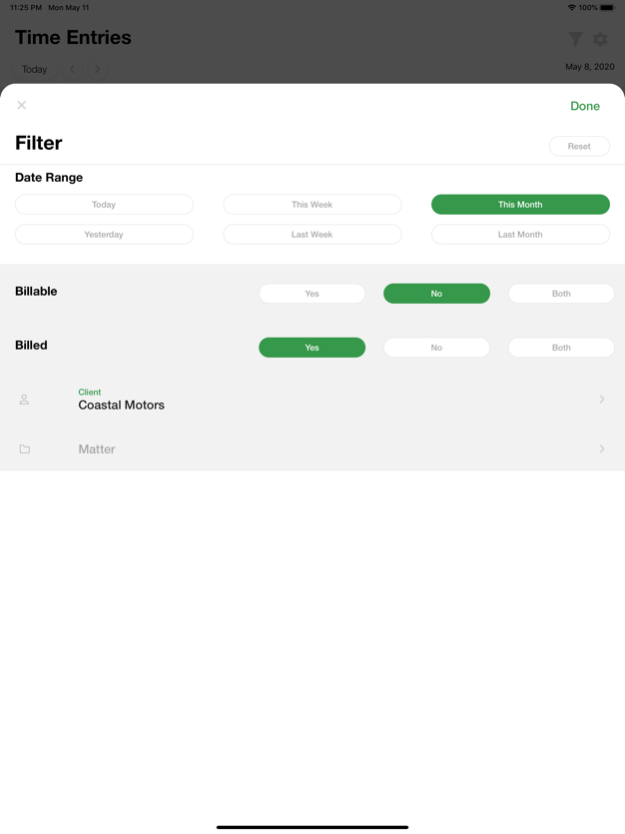
2. Behind-the-scenes reliability improvements. 3.2.23 Aug 22 Bug fix: Time entries now appear under the correct date when filtering by calendar. 3.2.22 Jun 17 This update improves how descriptions are automatically filled in when you select LEDES activity, task, and expense codes.
- Descriptions now include both the code ID and label (e.g. "A111 Other") instead of just the label
- When using the "Use both activity and task code descriptions" setting, selecting or clearing either code correctly updates the description to reflect what's still selected
- Clearing an expense code now also clears its auto-filled description
- Performance and stability improvements under the hood 3.2.21 Jun 9 Improvements to in-app analytics and minor stability fixes. 3.2.18 May 29 LEDES Codes: Activity, Task, and Expense code fields now appear on time entries and expenses for LEDES-enabled matters, with required code validation enforced before saving. Previously, when creating time entries for a client/matter using LEDES billing on the mobile app, the option to enter the LEDES information was not available — and if that info was required, you were unable to submit a time entry.
Auto-populate Description: Code selections auto-fill the description field; "Populate Descriptions Plus" combines both Activity + Task labels comma-separated.
Bug Fixes: Fixed LEDES fields disappearing on edit, race conditions during matter switching, and duplicate key warnings. 3.2.17 May 27 Client/Matter 3.2.10 May 11 Selecting "Gallery" when adding an expense attachment now opens the native photo gallery instead of the file manager. File Manager and Camera options remain unchanged. 3.2.9 Apr 22 What's New in 3.2.8
- Fixed calendar date selection issue
- Fixed "Set Time" toggle for start and end times
- Time entries now respect firm time increment settings
- Improved app startup performance
- Bug fixes and stability improvements 3.2.8 Apr 17 minor bug fix 3.2.7 Jan 19 Completion based fixed UI upgrades 3.1.43 04/21/2025 Fixed minor bug related to time entries 3.1.40 04/21/2025 This is a routine update. 3.1.39 ready for submission 04/05/2025 fix error when attempting to modify time entries 3.1.36 07/20/2024 - minor bug fix 3.1.35 07/17/2024 Maintenance update 3.1.28 01/16/2024 Support for our upcoming expense attachment feature 3.1.26 01/13/2024 Minor bug fixes. 2.0.28 08/04/2020 - Add the ability to set custom flags
- Add the ability to select description snippets. 2.0.26 06/19/2020 - Bug fixes
- Allow updating timers duration
- Allow setting time entries start/end time 2.024 06/01/2020 Added support for entries and expenses pagination. 2.0.23 05/19/2020 Bug fixes:
- Allow users to only see their own expenses and time entries.
- Allow users to log in to another account and after logging out. 2.0.20 05/17/2020 The LeanLaw app has been updated with a fresh look and improved speed and usability. We’ve added the following features:
- Time tracking with LEDES codes
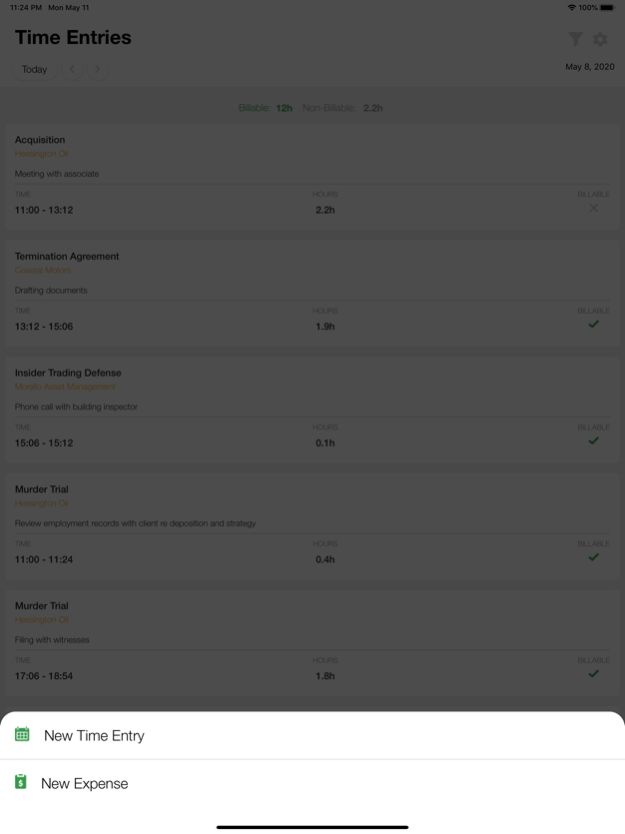
- Expense tracking
- Timers
We want to keep making it better! We encourage feedback. Thanks in advance. 2.0.17 05/13/2020 Google Authentication should be fixed; let us know if you experience any issues when signing in. 1.3 05/26/2017


About LeanLaw - Legal Billing Tool

LeanLaw - Legal Billing Tool is a free app for iOS published in the Vertical Market Apps list of apps, part of Business.

The company that develops LeanLaw - Legal Billing Tool is LeanLaw. The latest version released by its developer is 3.2.30.

To install LeanLaw - Legal Billing Tool on your iOS device, just click the green Continue To App button above to start the installation process. The app is listed on our website since 2026-10-13 and was downloaded 0 times. We have already checked if the download link is safe, however for your own protection we recommend that you scan the downloaded app with your antivirus. Your antivirus may detect the LeanLaw - Legal Billing Tool as malware if the download link is broken.

How to install LeanLaw - Legal Billing Tool on your iOS device:

  • Click on the Continue To App button on our website. This will redirect you to the App Store.
  • Once the LeanLaw - Legal Billing Tool is shown in the iTunes listing of your iOS device, you can start its download and installation. Tap on the GET button to the right of the app to start downloading it.
  • If you are not logged-in the iOS appstore app, you'll be prompted for your your Apple ID and/or password.
  • After LeanLaw - Legal Billing Tool is downloaded, you'll see an INSTALL button to the right. Tap on it to start the actual installation of the iOS app.
  • Once installation is finished you can tap on the OPEN button to start it. Its icon will also be added to your device home screen.

Program Details


General

Publisher
Released Date
2026-10-13
Languages
English

Category

Category
Subcategory

System requirements

Operating systems
iOS

Download information

File size
34 bytes
Total downloads
0

Pricing

License model
Free
Price

Version History


Here you can find the changelog of LeanLaw - Legal Billing Tool since it was posted on our website on 2016-12-24. The latest version is 3.2.30 and it was updated on Apps112 on 15 October, 2026. See below the changes in each version:

version 3.2.30

posted on 2026-10-13

Version History - Adding DisplayName field to charge dropdown APIs 3.2.30 Sep 26 Updated the LeanLaw logo, app icon, and sign-in screen to match our current branding — Your Legal Revenue Operations Partner. The icon on your home screen will look a little different; it's still the same LeanLaw Mobile. 3.2.24 Aug 30 1. Added a friendly reminder when a newer version of the app is available, so you always know when it's time to update.
2. Behind-the-scenes reliability improvements. 3.2.23 Aug 22 Bug fix: Time entries now appear under the correct date when filtering by calendar. 3.2.22 Jun 17 This update improves how descriptions are automatically filled in when you select LEDES activity, task, and expense codes.
- Descriptions now include both the code ID and label (e.g. "A111 Other") instead of just the label
- When using the "Use both activity and task code descriptions" setting, selecting or clearing either code correctly updates the description to reflect what's still selected
- Clearing an expense code now also clears its auto-filled description
- Performance and stability improvements under the hood 3.2.21 Jun 9 Improvements to in-app analytics and minor stability fixes. 3.2.18 May 29 LEDES Codes: Activity, Task, and Expense code fields now appear on time entries and expenses for LEDES-enabled matters, with required code validation enforced before saving. Previously, when creating time entries for a client/matter using LEDES billing on the mobile app, the option to enter the LEDES information was not available — and if that info was required, you were unable to submit a time entry.
Auto-populate Description: Code selections auto-fill the description field; "Populate Descriptions Plus" combines both Activity + Task labels comma-separated.
Bug Fixes: Fixed LEDES fields disappearing on edit, race conditions during matter switching, and duplicate key warnings. 3.2.17 May 27 Client/Matter 3.2.10 May 11 Selecting "Gallery" when adding an expense attachment now opens the native photo gallery instead of the file manager. File Manager and Camera options remain unchanged. 3.2.9 Apr 22 What's New in 3.2.8
- Fixed calendar date selection issue
- Fixed "Set Time" toggle for start and end times
- Time entries now respect firm time increment settings
- Improved app startup performance
- Bug fixes and stability improvements 3.2.8 Apr 17 minor bug fix 3.2.7 Jan 19 Completion based fixed UI upgrades 3.1.43 04/21/2025 Fixed minor bug related to time entries 3.1.40 04/21/2025 This is a routine update. 3.1.39 ready for submission 04/05/2025 fix error when attempting to modify time entries 3.1.36 07/20/2024 - minor bug fix 3.1.35 07/17/2024 Maintenance update 3.1.28 01/16/2024 Support for our upcoming expense attachment feature 3.1.26 01/13/2024 Minor bug fixes. 2.0.28 08/04/2020 - Add the ability to set custom flags
- Add the ability to select description snippets. 2.0.26 06/19/2020 - Bug fixes
- Allow updating timers duration
- Allow setting time entries start/end time 2.024 06/01/2020 Added support for entries and expenses pagination. 2.0.23 05/19/2020 Bug fixes:
- Allow users to only see their own expenses and time entries.
- Allow users to log in to another account and after logging out. 2.0.20 05/17/2020 The LeanLaw app has been updated with a fresh look and improved speed and usability. We’ve added the following features:
- Time tracking with LEDES codes
- Expense tracking
- Timers
We want to keep making it better! We encourage feedback. Thanks in advance. 2.0.17 05/13/2020 Google Authentication should be fixed; let us know if you experience any issues when signing in. 1.3 05/26/2017

version 3.2.30

posted on 2026-10-02

Version History - Adding DisplayName field to charge dropdown APIs 3.2.30 5d ago Updated the LeanLaw logo, app icon, and sign-in screen to match our current branding — Your Legal Revenue Operations Partner. The icon on your home screen will look a little different; it's still the same LeanLaw Mobile. 3.2.24 Aug 30 1. Added a friendly reminder when a newer version of the app is available, so you always know when it's time to update.
2. Behind-the-scenes reliability improvements. 3.2.23 Aug 22 Bug fix: Time entries now appear under the correct date when filtering by calendar. 3.2.22 Jun 17 This update improves how descriptions are automatically filled in when you select LEDES activity, task, and expense codes.
- Descriptions now include both the code ID and label (e.g. "A111 Other") instead of just the label
- When using the "Use both activity and task code descriptions" setting, selecting or clearing either code correctly updates the description to reflect what's still selected
- Clearing an expense code now also clears its auto-filled description
- Performance and stability improvements under the hood 3.2.21 Jun 9 Improvements to in-app analytics and minor stability fixes. 3.2.18 May 29 LEDES Codes: Activity, Task, and Expense code fields now appear on time entries and expenses for LEDES-enabled matters, with required code validation enforced before saving. Previously, when creating time entries for a client/matter using LEDES billing on the mobile app, the option to enter the LEDES information was not available — and if that info was required, you were unable to submit a time entry.
Auto-populate Description: Code selections auto-fill the description field; "Populate Descriptions Plus" combines both Activity + Task labels comma-separated.
Bug Fixes: Fixed LEDES fields disappearing on edit, race conditions during matter switching, and duplicate key warnings. 3.2.17 May 27 Client/Matter 3.2.10 May 11 Selecting "Gallery" when adding an expense attachment now opens the native photo gallery instead of the file manager. File Manager and Camera options remain unchanged. 3.2.9 Apr 22 What's New in 3.2.8
- Fixed calendar date selection issue
- Fixed "Set Time" toggle for start and end times
- Time entries now respect firm time increment settings
- Improved app startup performance
- Bug fixes and stability improvements 3.2.8 Apr 17 minor bug fix 3.2.7 Jan 19 Completion based fixed UI upgrades 3.1.43 04/21/2025 Fixed minor bug related to time entries 3.1.40 04/21/2025 This is a routine update. 3.1.39 ready for submission 04/05/2025 fix error when attempting to modify time entries 3.1.36 07/20/2024 - minor bug fix 3.1.35 07/17/2024 Maintenance update 3.1.28 01/16/2024 Support for our upcoming expense attachment feature 3.1.26 01/13/2024 Minor bug fixes. 2.0.28 08/04/2020 - Add the ability to set custom flags
- Add the ability to select description snippets. 2.0.26 06/19/2020 - Bug fixes
- Allow updating timers duration
- Allow setting time entries start/end time 2.024 06/01/2020 Added support for entries and expenses pagination. 2.0.23 05/19/2020 Bug fixes:
- Allow users to only see their own expenses and time entries.
- Allow users to log in to another account and after logging out. 2.0.20 05/17/2020 The LeanLaw app has been updated with a fresh look and improved speed and usability. We’ve added the following features:
- Time tracking with LEDES codes
- Expense tracking
- Timers
We want to keep making it better! We encourage feedback. Thanks in advance. 2.0.17 05/13/2020 Google Authentication should be fixed; let us know if you experience any issues when signing in. 1.3 05/26/2017

version 3.2.24

posted on 2026-09-25

Version History Updated the LeanLaw logo, app icon, and sign-in screen to match our current branding — Your Legal Revenue Operations Partner. The icon on your home screen will look a little different; it's still the same LeanLaw Mobile. 3.2.24 Aug 30 1. Added a friendly reminder when a newer version of the app is available, so you always know when it's time to update.
2. Behind-the-scenes reliability improvements. 3.2.23 Aug 22 Bug fix: Time entries now appear under the correct date when filtering by calendar. 3.2.22 Jun 17 This update improves how descriptions are automatically filled in when you select LEDES activity, task, and expense codes.
- Descriptions now include both the code ID and label (e.g. "A111 Other") instead of just the label
- When using the "Use both activity and task code descriptions" setting, selecting or clearing either code correctly updates the description to reflect what's still selected
- Clearing an expense code now also clears its auto-filled description
- Performance and stability improvements under the hood 3.2.21 Jun 9 Improvements to in-app analytics and minor stability fixes. 3.2.18 May 29 LEDES Codes: Activity, Task, and Expense code fields now appear on time entries and expenses for LEDES-enabled matters, with required code validation enforced before saving. Previously, when creating time entries for a client/matter using LEDES billing on the mobile app, the option to enter the LEDES information was not available — and if that info was required, you were unable to submit a time entry.
Auto-populate Description: Code selections auto-fill the description field; "Populate Descriptions Plus" combines both Activity + Task labels comma-separated.
Bug Fixes: Fixed LEDES fields disappearing on edit, race conditions during matter switching, and duplicate key warnings. 3.2.17 May 27 Client/Matter 3.2.10 May 11 Selecting "Gallery" when adding an expense attachment now opens the native photo gallery instead of the file manager. File Manager and Camera options remain unchanged. 3.2.9 Apr 22 What's New in 3.2.8
- Fixed calendar date selection issue
- Fixed "Set Time" toggle for start and end times
- Time entries now respect firm time increment settings
- Improved app startup performance
- Bug fixes and stability improvements 3.2.8 Apr 17 minor bug fix 3.2.7 Jan 19 Completion based fixed UI upgrades 3.1.43 04/21/2025 Fixed minor bug related to time entries 3.1.40 04/21/2025 This is a routine update. 3.1.39 ready for submission 04/05/2025 fix error when attempting to modify time entries 3.1.36 07/20/2024 - minor bug fix 3.1.35 07/17/2024 Maintenance update 3.1.28 01/16/2024 Support for our upcoming expense attachment feature 3.1.26 01/13/2024 Minor bug fixes. 2.0.28 08/04/2020 - Add the ability to set custom flags
- Add the ability to select description snippets. 2.0.26 06/19/2020 - Bug fixes
- Allow updating timers duration
- Allow setting time entries start/end time 2.024 06/01/2020 Added support for entries and expenses pagination. 2.0.23 05/19/2020 Bug fixes:
- Allow users to only see their own expenses and time entries.
- Allow users to log in to another account and after logging out. 2.0.20 05/17/2020 The LeanLaw app has been updated with a fresh look and improved speed and usability. We’ve added the following features:
- Time tracking with LEDES codes
- Expense tracking
- Timers
We want to keep making it better! We encourage feedback. Thanks in advance. 2.0.17 05/13/2020 Google Authentication should be fixed; let us know if you experience any issues when signing in. 1.3 05/26/2017 - Fixed bug causing constant "permission issue" when assigning time to matters
- Minor updates 1.2 02/24/2017

version 3.2.24

posted on 2026-09-03

Version History Updated the LeanLaw logo, app icon, and sign-in screen to match our current branding — Your Legal Revenue Operations Partner. The icon on your home screen will look a little different; it's still the same LeanLaw Mobile. 3.2.24 4d ago 1. Added a friendly reminder when a newer version of the app is available, so you always know when it's time to update.
2. Behind-the-scenes reliability improvements. 3.2.23 Aug 22 Bug fix: Time entries now appear under the correct date when filtering by calendar. 3.2.22 Jun 17 This update improves how descriptions are automatically filled in when you select LEDES activity, task, and expense codes.
- Descriptions now include both the code ID and label (e.g. "A111 Other") instead of just the label
- When using the "Use both activity and task code descriptions" setting, selecting or clearing either code correctly updates the description to reflect what's still selected
- Clearing an expense code now also clears its auto-filled description
- Performance and stability improvements under the hood 3.2.21 Jun 9 Improvements to in-app analytics and minor stability fixes. 3.2.18 May 29 LEDES Codes: Activity, Task, and Expense code fields now appear on time entries and expenses for LEDES-enabled matters, with required code validation enforced before saving. Previously, when creating time entries for a client/matter using LEDES billing on the mobile app, the option to enter the LEDES information was not available — and if that info was required, you were unable to submit a time entry.
Auto-populate Description: Code selections auto-fill the description field; "Populate Descriptions Plus" combines both Activity + Task labels comma-separated.
Bug Fixes: Fixed LEDES fields disappearing on edit, race conditions during matter switching, and duplicate key warnings. 3.2.17 May 27 Client/Matter 3.2.10 May 11 Selecting "Gallery" when adding an expense attachment now opens the native photo gallery instead of the file manager. File Manager and Camera options remain unchanged. 3.2.9 Apr 22 What's New in 3.2.8
- Fixed calendar date selection issue
- Fixed "Set Time" toggle for start and end times
- Time entries now respect firm time increment settings
- Improved app startup performance
- Bug fixes and stability improvements 3.2.8 Apr 17 minor bug fix 3.2.7 Jan 19 Completion based fixed UI upgrades 3.1.43 04/21/2025 Fixed minor bug related to time entries 3.1.40 04/21/2025 This is a routine update. 3.1.39 ready for submission 04/05/2025 fix error when attempting to modify time entries 3.1.36 07/20/2024 - minor bug fix 3.1.35 07/17/2024 Maintenance update 3.1.28 01/16/2024 Support for our upcoming expense attachment feature 3.1.26 01/13/2024 Minor bug fixes. 2.0.28 08/04/2020 - Add the ability to set custom flags
- Add the ability to select description snippets. 2.0.26 06/19/2020 - Bug fixes
- Allow updating timers duration
- Allow setting time entries start/end time 2.024 06/01/2020 Added support for entries and expenses pagination. 2.0.23 05/19/2020 Bug fixes:
- Allow users to only see their own expenses and time entries.
- Allow users to log in to another account and after logging out. 2.0.20 05/17/2020 The LeanLaw app has been updated with a fresh look and improved speed and usability. We’ve added the following features:
- Time tracking with LEDES codes
- Expense tracking
- Timers
We want to keep making it better! We encourage feedback. Thanks in advance. 2.0.17 05/13/2020 Google Authentication should be fixed; let us know if you experience any issues when signing in. 1.3 05/26/2017 - Fixed bug causing constant "permission issue" when assigning time to matters
- Minor updates 1.2 02/24/2017

version 3.2.22

posted on 2026-08-22

Version History Bug fix: Time entries now appear under the correct date when filtering by calendar. 3.2.22 Jun 17 This update improves how descriptions are automatically filled in when you select LEDES activity, task, and expense codes.
- Descriptions now include both the code ID and label (e.g. "A111 Other") instead of just the label
- When using the "Use both activity and task code descriptions" setting, selecting or clearing either code correctly updates the description to reflect what's still selected
- Clearing an expense code now also clears its auto-filled description
- Performance and stability improvements under the hood 3.2.21 Jun 9 Improvements to in-app analytics and minor stability fixes. 3.2.18 May 29 LEDES Codes: Activity, Task, and Expense code fields now appear on time entries and expenses for LEDES-enabled matters, with required code validation enforced before saving. Previously, when creating time entries for a client/matter using LEDES billing on the mobile app, the option to enter the LEDES information was not available — and if that info was required, you were unable to submit a time entry.
Auto-populate Description: Code selections auto-fill the description field; "Populate Descriptions Plus" combines both Activity + Task labels comma-separated.
Bug Fixes: Fixed LEDES fields disappearing on edit, race conditions during matter switching, and duplicate key warnings. 3.2.17 May 27 Client/Matter 3.2.10 May 11 Selecting "Gallery" when adding an expense attachment now opens the native photo gallery instead of the file manager. File Manager and Camera options remain unchanged. 3.2.9 Apr 22 What's New in 3.2.8
- Fixed calendar date selection issue
- Fixed "Set Time" toggle for start and end times
- Time entries now respect firm time increment settings
- Improved app startup performance
- Bug fixes and stability improvements 3.2.8 Apr 17 minor bug fix 3.2.7 Jan 19 Completion based fixed UI upgrades 3.1.43 04/21/2025 Fixed minor bug related to time entries 3.1.40 04/21/2025 This is a routine update. 3.1.39 ready for submission 04/05/2025 fix error when attempting to modify time entries 3.1.36 07/20/2024 - minor bug fix 3.1.35 07/17/2024 Maintenance update 3.1.28 01/16/2024 Support for our upcoming expense attachment feature 3.1.26 01/13/2024 Minor bug fixes. 2.0.28 08/04/2020 - Add the ability to set custom flags
- Add the ability to select description snippets. 2.0.26 06/19/2020 - Bug fixes
- Allow updating timers duration
- Allow setting time entries start/end time 2.024 06/01/2020 Added support for entries and expenses pagination. 2.0.23 05/19/2020 Bug fixes:
- Allow users to only see their own expenses and time entries.
- Allow users to log in to another account and after logging out. 2.0.20 05/17/2020 The LeanLaw app has been updated with a fresh look and improved speed and usability. We’ve added the following features:
- Time tracking with LEDES codes
- Expense tracking
- Timers
We want to keep making it better! We encourage feedback. Thanks in advance. 2.0.17 05/13/2020 Google Authentication should be fixed; let us know if you experience any issues when signing in. 1.3 05/26/2017 - Fixed bug causing constant "permission issue" when assigning time to matters
- Minor updates 1.2 02/24/2017 It is now possible to set a Responsible for new Matters.
Additional bug fixes and improvements are included. 1.1 02/08/2017 1.0 08/11/2016

version 3.2.18

posted on 2026-06-02

Version History Improvements to in-app analytics and minor stability fixes. 3.2.18 4d ago LEDES Codes: Activity, Task, and Expense code fields now appear on time entries and expenses for LEDES-enabled matters, with required code validation enforced before saving. Previously, when creating time entries for a client/matter using LEDES billing on the mobile app, the option to enter the LEDES information was not available — and if that info was required, you were unable to submit a time entry.
Auto-populate Description: Code selections auto-fill the description field; "Populate Descriptions Plus" combines both Activity + Task labels comma-separated.
Bug Fixes: Fixed LEDES fields disappearing on edit, race conditions during matter switching, and duplicate key warnings. 3.2.17 6d ago Client/Matter 3.2.10 May 11 Selecting "Gallery" when adding an expense attachment now opens the native photo gallery instead of the file manager. File Manager and Camera options remain unchanged. 3.2.9 Apr 22 What's New in 3.2.8
- Fixed calendar date selection issue
- Fixed "Set Time" toggle for start and end times
- Time entries now respect firm time increment settings
- Improved app startup performance
- Bug fixes and stability improvements 3.2.8 Apr 17 minor bug fix 3.2.7 Jan 19 Completion based fixed UI upgrades 3.1.43 04/21/2025 Fixed minor bug related to time entries 3.1.40 04/21/2025 This is a routine update. 3.1.39 ready for submission 04/05/2025 fix error when attempting to modify time entries 3.1.36 07/20/2024 - minor bug fix 3.1.35 07/17/2024 Maintenance update 3.1.28 01/16/2024 Support for our upcoming expense attachment feature 3.1.26 01/13/2024 Minor bug fixes. 2.0.28 08/04/2020 - Add the ability to set custom flags
- Add the ability to select description snippets. 2.0.26 06/19/2020 - Bug fixes
- Allow updating timers duration
- Allow setting time entries start/end time 2.024 06/01/2020 Added support for entries and expenses pagination. 2.0.23 05/19/2020 Bug fixes:
- Allow users to only see their own expenses and time entries.
- Allow users to log in to another account and after logging out. 2.0.20 05/17/2020 The LeanLaw app has been updated with a fresh look and improved speed and usability. We’ve added the following features:
- Time tracking with LEDES codes
- Expense tracking
- Timers
We want to keep making it better! We encourage feedback. Thanks in advance. 2.0.17 05/13/2020 Google Authentication should be fixed; let us know if you experience any issues when signing in. 1.3 05/26/2017 - Fixed bug causing constant "permission issue" when assigning time to matters
- Minor updates 1.2 02/24/2017 It is now possible to set a Responsible for new Matters.
Additional bug fixes and improvements are included. 1.1 02/08/2017 1.0 08/11/2016

version 3.2.7

posted on 2026-01-19

minor bug fix

version 3.1.43

posted on 2025-04-21

Apr 21, 2025
Version 3.1.43
Completion based fixed UI upgrades

version 3.1.39 ready for submission

posted on 2025-04-05

Apr 5, 2025
Version 3.1.39 ready for submission
This is a routine update.

version 3.1.36

posted on 2024-07-20

Jul 20, 2024
Version 3.1.36
fix error when attempting to modify time entries

Disclaimer


Official App Store Link


We do not host LeanLaw - Legal Billing Tool on our servers. We did not scan it for viruses, adware, spyware or other type of malware. This app is hosted by Apple and passed their terms and conditions to be listed there. We recommend caution when installing it.

The App Store link for LeanLaw - Legal Billing Tool is provided to you by apps112.com without any warranties, representations or guarantees of any kind, so access it at your own risk.

If you have questions regarding this particular app contact the publisher directly. For questions about the functionalities of apps112.com contact us.



Click stars to rate this APP!

Users Rating:
  0.0/5     0
Downloads: 0
Updated At: 2026-10-15
Publisher: LeanLaw
Operating System: iOS
License Type: Free

TOP DOWNLOADS
in Business last week